Quick answer: Cable or Wire?
✂️ Answer lookup
Cable decision card
Enter the two clues and cable order to identify the target colour and final cut position.
The rule chooses a target colour; the order turns it into a physical cable position.
🔌 Callout cue: count → 💡 light → position → ✂️ cut → ✅ confirm.
The same module is referred to as Cable in the current module reference and Wire in some player searches. It is an Easy defusal module: cut the correct cable using the number of connected cables and the colour of the active light. The reference lists a 4 × 2 footprint and a first fixed appearance at Level 1.
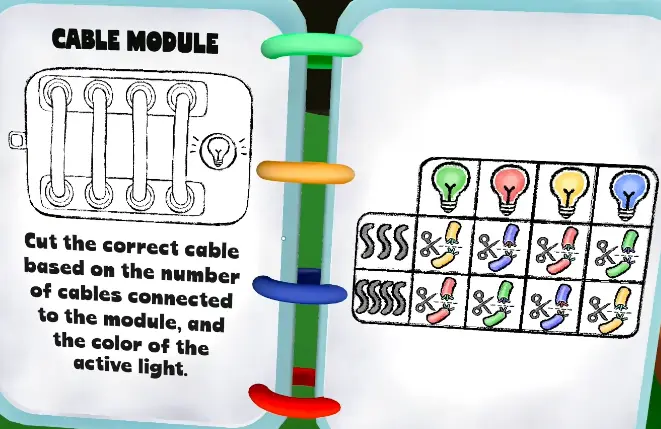
Read the panel before touching it
Cable uses a compact 4 × 2 panel. First count the connected cables and identify the active light colour. Deaf should describe both facts; Mute should locate the matching table entry; Blind should keep a finger on the chosen cable and wait for confirmation. The safest sequence is:
- Name the panel as Cable/Wire.
- Count the cables and name the active light colour.
- Repeat the selected cable number and colour rule.
- Cut once and report the result.
Cable target lookup
The cable count selects the table branch. The practice panel combines the branch with the active light and then finds the target colour in the left-to-right cable order.
| Cable count | Red light | Blue light | Green light | Yellow light |
|---|---|---|---|---|
| 3 | Blue | Green | Yellow | Red |
| 4 | Green | Yellow | Red | Blue |
If the target colour is missing from the entered order, the panel refuses to produce a cut position. That is intentional: reread the count, light, and cable order instead of substituting a different cable.
Why cable callouts fail
The most common failure is not the cut itself; it is a mismatch between the manual’s cable count and the blind player’s viewpoint. Use a fixed convention such as “left-to-right from the top row” and repeat it on every stage. If a cable is partly hidden by a hand or effect, ask for a second visual description instead of filling in the missing colour.
The reference lists three fixed campaign appearances. Random difficulty slots may contain Cable in other runs, but they are not guaranteed placements.
Campaign and practice route
Cable appears in fixed campaign slots in the early and mid-game reference. Use Level Lookup to see the expected module mix, then practise its Level 1 entry before adding Chaos modules. The existing Wire guide remains useful for the alternate search wording; this page is the canonical Cable naming page.
Related modules
Compare Cable with the Direction module when your team needs a fast visual-to-manual workflow, or move to Calculator when the panel requires an equation rather than a cut.