🎹 Answer lookup
Piano sequence card
Select the Braille octave and active light, then reveal the four-note answer before pressing.
Correct answer: —
Choose the Braille dots and active light, then click the button to reveal and highlight the correct sequence.
Piano answer table
| Braille octave | Number | red | yellow | green | blue |
|---|---|---|---|---|---|
| ⠁ | 1 | C · D · E · C | C · E · G · C | C · D · E · F | E · E · F · G |
| ⠃ | 2 | G · E · E · F | F · A · C · F | G · A · B · C | A · E · A · B |
| ⠉ | 3 | C · C · G · C | G · B · D · G | E · F · G · A | C · D · C · E |
| ⠙ | 4 | E · D · C · D | E · C · D · G | D · F · A · D | G · C · G · E |
| ⠑ | 5 | A · B · C · A | A · G · A · F | C · G · C · G | B · G · A · B |
| ⠋ | 6 | G · F · E · D | B · A · G · F | F · E · D · C | D · E · D · C |
| ⠛ | 7 | B · F · G · A | D · C · B · A | G · B · A · G | A · B · A · G |
What is the Piano module?
The Piano is a defusal module that uses a Braille octave and an active light colour to select a four-note answer. The piano keys shown on this page are the possible answer notes; they are not a separate clue that needs to be decoded first.
How do you solve the Piano puzzle?
To solve the Piano puzzle, read the Braille octave and active light from the module, select the same two clues in the lookup card, and click Show correct answer. The page then displays the answer and highlights the piano keys used by that sequence.
Quick answer
- Read the Braille octave shown on the module.
- Read the active light colour.
- Select both clues in the Piano card.
- Click Show correct answer.
- Press the four notes in the displayed order.
- Stop and check the stage if the panel resets or advances.
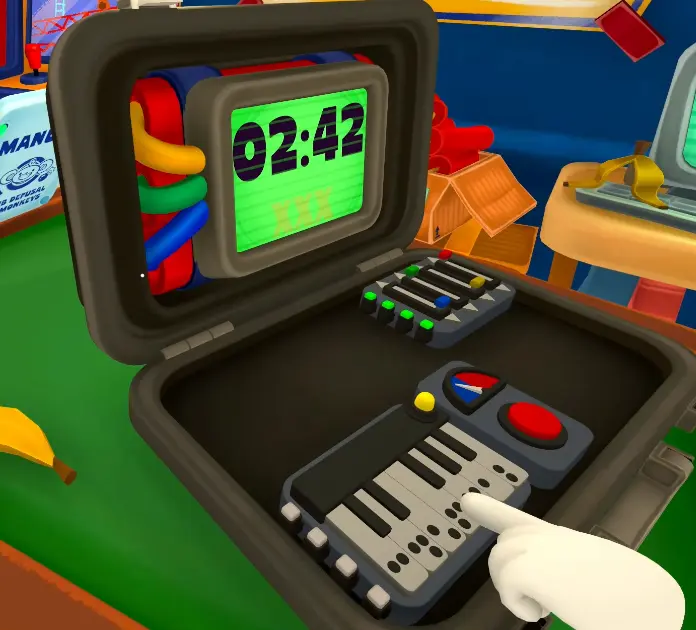
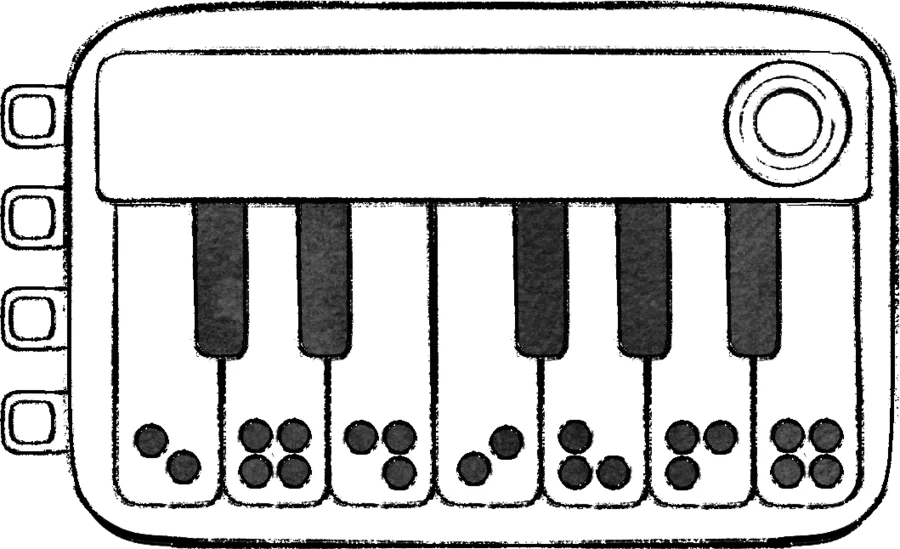
Use the card for the current answer. Use the table below when you want to check another Braille octave and light combination.
Piano module facts
| Field | Reference answer |
|---|---|
| Difficulty | Medium |
| Module type | Defusal |
| Panel footprint | Check the current keyboard and Braille layout |
| First fixed campaign appearance | Level 9 |
| Fixed campaign appearances | Levels 9 and 10 |
The note sequence is selected by the Braille octave dots and the active light colour. The dots identify a row and the light identifies a column. Read the matching four-note cell in the current in-game manual before using a sequence in a live run; the available rows and columns can change with the build.
Worked-state status
Braille octave plus active light selects one four-note cell. The Piano sequence card reveals the matching answer only after both clues are selected and Show correct answer is clicked. Use the card to rehearse the callout, then compare it with the current in-game manual if the build or table changes.
Piano callout card
| Emoji | Callout field | What to say |
|---|---|---|
| 🔢 | Braille octave | Give the Braille dots directly, for example ⠉; the number mapping below is only a reference. |
| 💡 | Active light | Give the light colour together with the dots; either clue alone is incomplete. |
| 🎵 | Four-note packet | Read the notes in order and keep repeated notes. |
| 🔁 | Repeat-back | The input player repeats the full packet before pressing. |
| ✅ | Accepted | Confirm that the panel advanced before using another sequence. |
| 🛑 | Rebuild | If one note or the light is disputed, reread number + light. |
Two independent module references agree on the lookup shape—Braille octave plus active light selects the note sequence. The emoji is a communication aid; the current in-game manual remains the authority for the exact four notes.
How do you look up the note order?
Use the Braille octave as the row and the active light as the column. The matching cell in the Piano answer table contains four notes. Read those notes from left to right and keep every repeated note.
Piano lookup status
| What the player has | What it proves | What is still required |
|---|---|---|
| Braille octave dots | Selects the row | Confirm the active light |
| Active light colour | Selects the column | Read the four-note cell in the live manual |
| Four notes in order | Defines the input packet | Repeat the packet before pressing |
The 7-by-4 answer table is shown below the interactive card. Select the Braille dots directly, choose the active light, and click Show correct answer. The card’s answer line preserves the exact order, including repeated notes; the table below is the reference for checking other combinations. The current in-game manual remains the authority if a later build changes the table.
What order should you press the Piano notes?
Press the four notes exactly in the order shown by Correct answer. For example, if the answer is C → D → E → C, press C, then D, then E, then C. Do not reorder the notes, skip a repeated note, or add an extra press.
Keyboard orientation 🎹
The visible keys follow the ordinary left-to-right note order C → D → E → F → G → A → B. The highlighted keys show which notes are used; read the answer line for the exact order and for repeated notes such as C → D → E → C. Use the letter order to orient the operator; it does not replace the Braille-and-light lookup.
What if the sequence fails?
Check whether the stage advanced or reset, record the exact state, and compare it with the puzzle index.
What should be written down before pressing?
Write the stage number, Braille octave dots, active light, and the four-note sequence shown by the lookup. The operator should repeat the sequence once, then press it without improvising a missing note. If the panel resets, keep the failed state in the notes so the team can tell a wrong lookup from a missed input.
What is the complete piano workflow?
- Name the piano module and stage.
- Read and report the Braille octave dots.
- Read and report the active light colour.
- Select both clues and click Show correct answer, or read the matching cell in the current manual.
- Have the operator repeat all four notes in order before pressing.
- Record whether the panel advanced, reset, or rejected the input.
Do not begin pressing while the observer is still confirming the dots and light. A sequence that is correct for one stage may be wrong after the panel advances.
The Piano sequence card on this page is the practice and read-back utility: choose the Braille octave dots and active light, click Show correct answer, and use the highlighted keys plus the answer line to rehearse the packet. Record the state and have the operator repeat the sequence before pressing. The general Module Solver currently covers other module types, so use the Piano card and the current in-game manual for this module.
How should repeated notes be called?
Use the answer line as the source of order: “C, D, E, C,” rather than only listing the highlighted keys. This avoids confusion when the same note appears more than once. If the team uses shorthand, keep it stable for the whole level and write the long form in the notes.
What should happen after a failed sequence?
Stop, reread the stage, and check whether the panel reset or advanced. Do not append another note to the old sequence until the current state is confirmed. Link back to the puzzle index if the visual panel no longer resembles the piano reference.
For level context, check Level Lookup and Campaign Progression. For coordinated callouts, see Roles and the Puzzle Index.